Open topic with navigation
Trigger based on User-Defined Yes/No Fields
This functionality enables a Promotion to be triggered based on User-Defined Yes/No Fields that are set in the Customer's record.
This will enable Promotions to be restricted to specific Customers based on the state of the Customer's User-Defined Yes/No Fields (e.g. Yes/No Fields ticked or unticked).
A Promotion will only trigger when a Customer has been added to the sale which has the required User-Defined Yes/No Fields AND they purchase the required Stock Items specified in the Promotion.
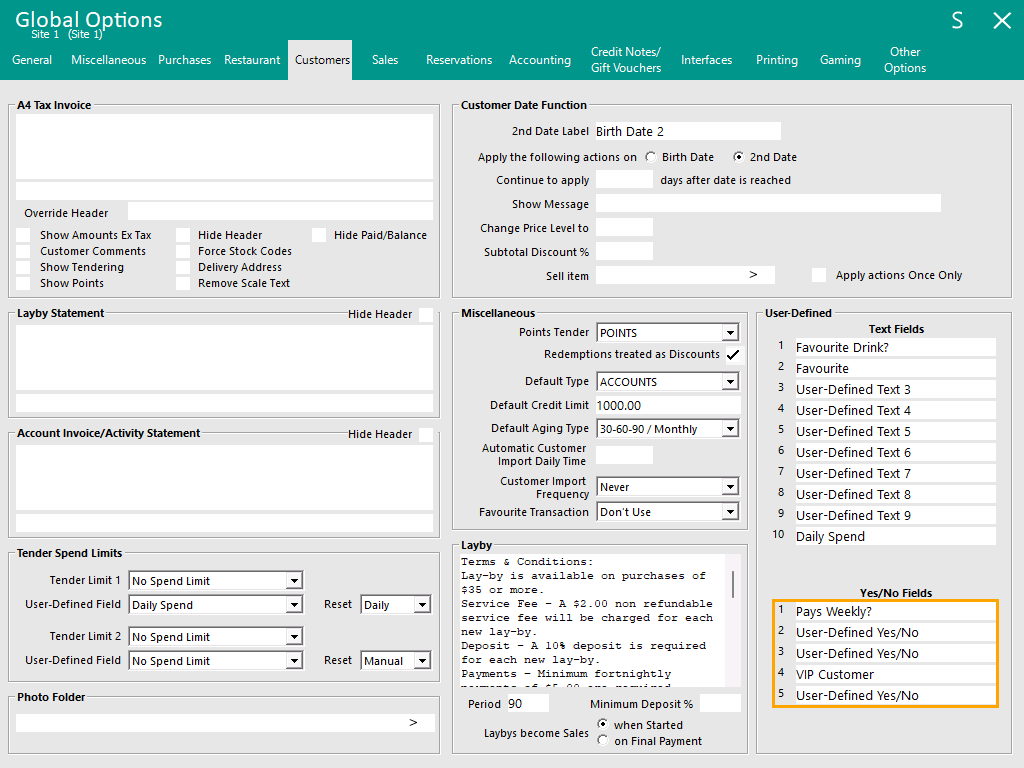
 Pre-Requisites - Setting up Global Options > Customers > User-Defined > Yes/No Fields
Go to: Back Office > Setup > Global Options > Customers > User-Defined.
In the Yes/No Fields section, there are 5 available Yes/No Fields.
These can be configured as required to record specific Yes/No details about the customer.
E.g. Pays Weekly, VIP Customer, Pensioner, etc.
Any User-Defined Yes/No Fields that are not currently used will appear as "User-Defined Yes/No".
Note that these Yes/No Fields will only store a Yes value (checkbox enabled) or a No value (checkbox unchecked).
For storing User-Defined Text values and triggering Promotions based on those User-Defined Text Fields, a separate function is available (see Trigger based on User-Defined Text Fields).
Pre-Requisites - Toggling the required Yes/No Fields for each Customer
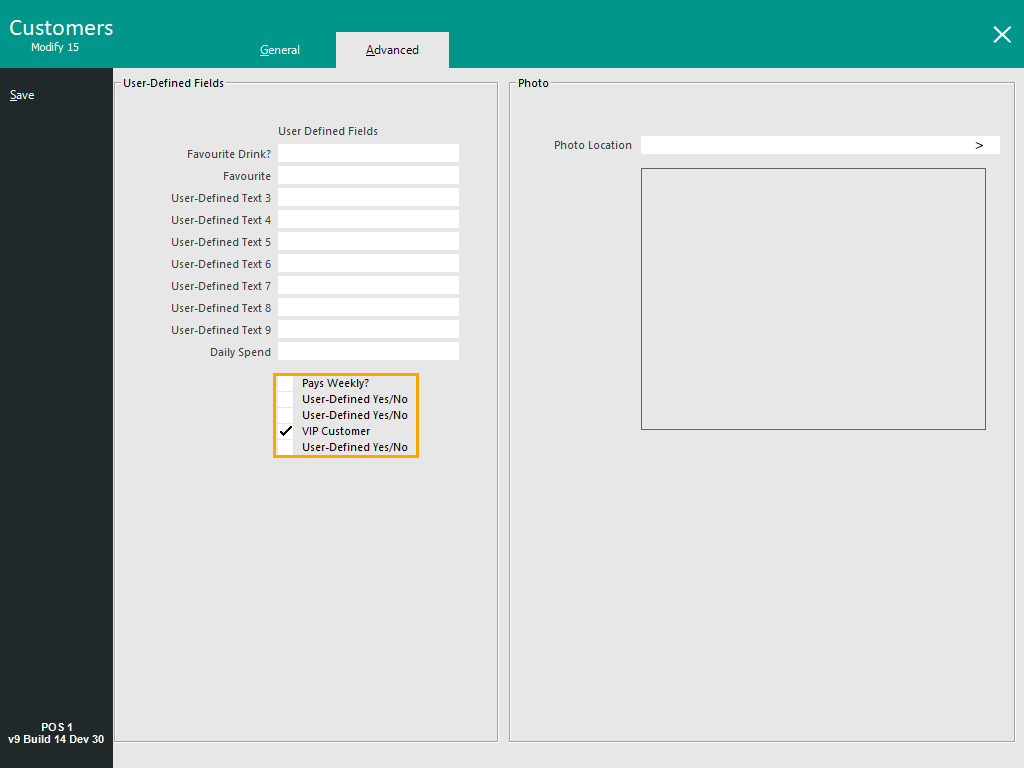
Go to: Back Office > File > Customers > Customers > Select a Customer > Modify.
In the Advanced tab, the User-Defined Yes/No Fields are displayed below the Text Fields.
Toggle the User-Defined Yes/No Fields as required.
When toggling the Yes/No Fields, take note of the following details as these will be required when setting up the Promotion below:
- The Yes/No Fields are numbered based on their row number; the first row is UDYN1, the last row is UDYN5.
- Any Y/N Field that is enabled will be referred to as Y and any Y/N Field that is disabled will be referred to as N.
Examples based on the screenshot below:
- If a Promo is to be restricted to VIP Customers, a User-Defined Text value of [UDYN4=Y] will need to be entered into the User-Defined field in the Promotion.
- If a Promo is to be restricted to non-VIP Customers, enter a User-Defined Text value of [UDYN4=N] will need to be entered into the User-Defined field in the Promotion.
- If a Promo is to be restricted to Customers that are Pays Weekly? AND VIP, enter a User-Defined Text value of [UDYN1=Y] [UDYN4=Y] will need to be entered in the Promotion.
- Multiple values for each User-Defined Yes/No Field can be specified in the Promotion; e.g. [UDYN4=Y,N]
- Multiple User-Defined Yes/No Fields can be specified in the Promotion; e.g. [UDYN1=Y] [UDYN4=N]
Press the "Save" button on the top-left corner once updated.
Repeat the above process for each Customer that requires the Yes/No Fields to be set.
Linking Promotions to User-Defined Yes/No Fields
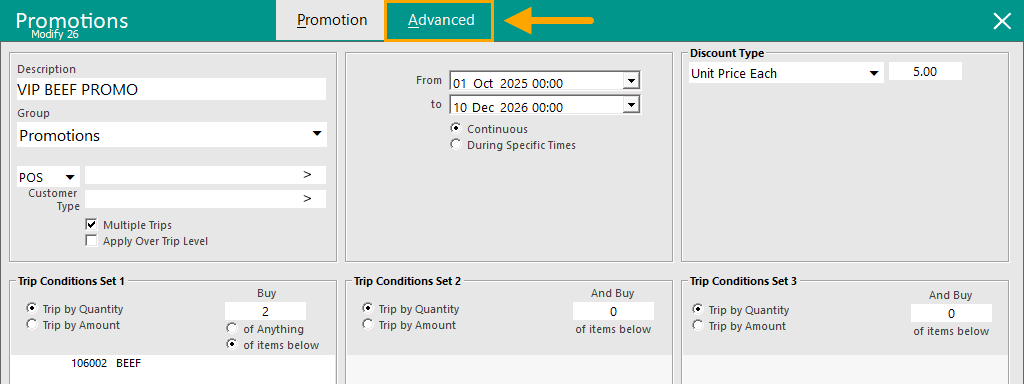
To link a Promotion to specific User-Defined Yes/No Fields, go to:
Back Office > File > Sales > Promotions > Promotions.
Add or Modify a Promotion.
Select the "Advanced" tab.
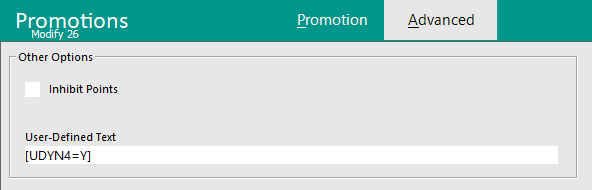
In the Advanced Tab of the Promotion, the User-Defined Text Field is used to specify which User-Defined Yes/No Fields will be required for the Promotion to trigger.
To demonstrate this functionality using the example above, the Promotion will be restricted to the User-Defined Yes/No Field 4 (which is configured as VIP Customer in the Global Options > Customers > Yes/No Fields).
Enter [UDYN4=Y] into the User-Defined Text field.
Tip!
As outlined above, this functionality supports the following combinations of User-Defined Yes/No Fields.
- Multiple User-Defined Yes/No Fields; E.g. Enter multiple Y/N Fields separated by a space: [UDYN1=Y] [UDYN2=N] [UDYN3=Y] [UDYN4=Y] [UDYN5=Y]
- Multiple values for each User-Defined Field; E.g. Enter multiple values separated by a comma: [UDYN1=Y,N]
- A combination of the above: E.g. [UDYN1=Y,N] [UDYN2=N] [UDYN3=Y,N]
Once the User-Defined Text has been configured accordingly, close the Modify/Add Promotion window and when prompted to "Save Changes", press "Yes".
Close the Promotions window.
The above process can be repeated to setup any other Promotions that are required to trigger based on User-Defined Yes/No Fields.
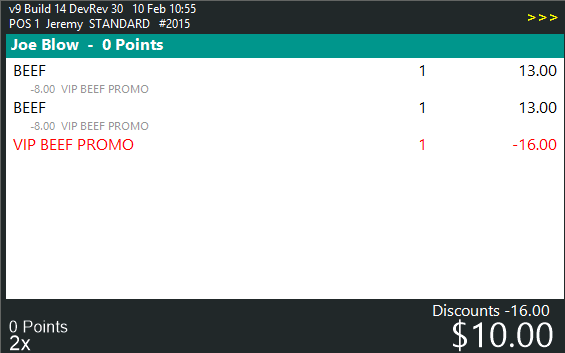
Example of Promotion being triggered
When the following conditions are met, the Promotion will trigger:
- Customer has User-Defined Yes/No Fields set in their customer record that are the same as the User-Defined Yes/No Fields set in the Promotion.
AND
- The Customer purchases the required items that are setup in the Promotion.
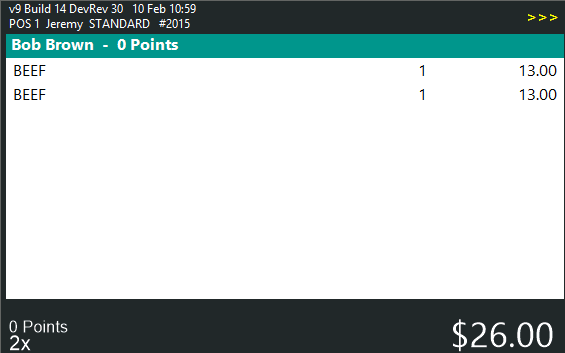
If the conditions are not met (no customer added to the sale or customer does not have the required Yes/No Fields), the Promotion will not trigger.
Open topic with navigation